*Internal* System Release Notes January 30, 2026
Sales Tax Remittance Report
As part of the continued expansion of the NextLot accounting system, a new report has been introduced to provide auction houses with a high-level view of their sales tax remittance. This report is designed to help auction houses easily track and evaluate how their tax remittance process is progressing over a certain period of time.
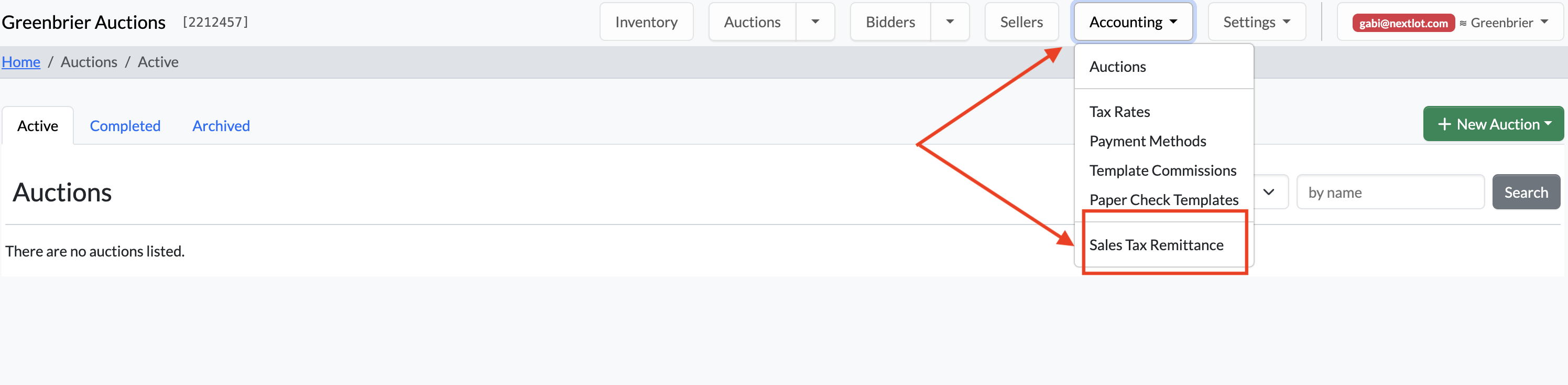
To access this report, navigate to the Accounting section and select Sales Tax Remittance. This is a time-based report, not an auction-level report. It displays all sales tax collected within a selected time period rather than breaking the data down by individual auctions.
You can view results by applying custom date filters or by using quick-select options such as Last Month or Last Quarter.
.png?width=960&height=284&name=Screenshot%202026-01-29%20at%201.38.08%20PM%20(2).png)
Once you apply the desired date filters, the Sales Tax Remittance Report will be divided into three sections: Sales Tax Rate Summary, Sales Tax Code Summary, and Sales Tax Summary.
Sales Tax Rate Summary
Within this section, you can view all Sales Tax Codes along with key totals, including:
-
Total Amount: The sum of all paid sold prices for lots assigned this Sales Tax Code, plus any Buyer’s Premium and applicable fees tied to those lots.
-
Non-Taxable Amount: Fees or charges that are not subject to this tax rate.
Example: If a lot has a different Buyer’s Premium (BP) sales tax than the sales tax code selected for the lot itself.
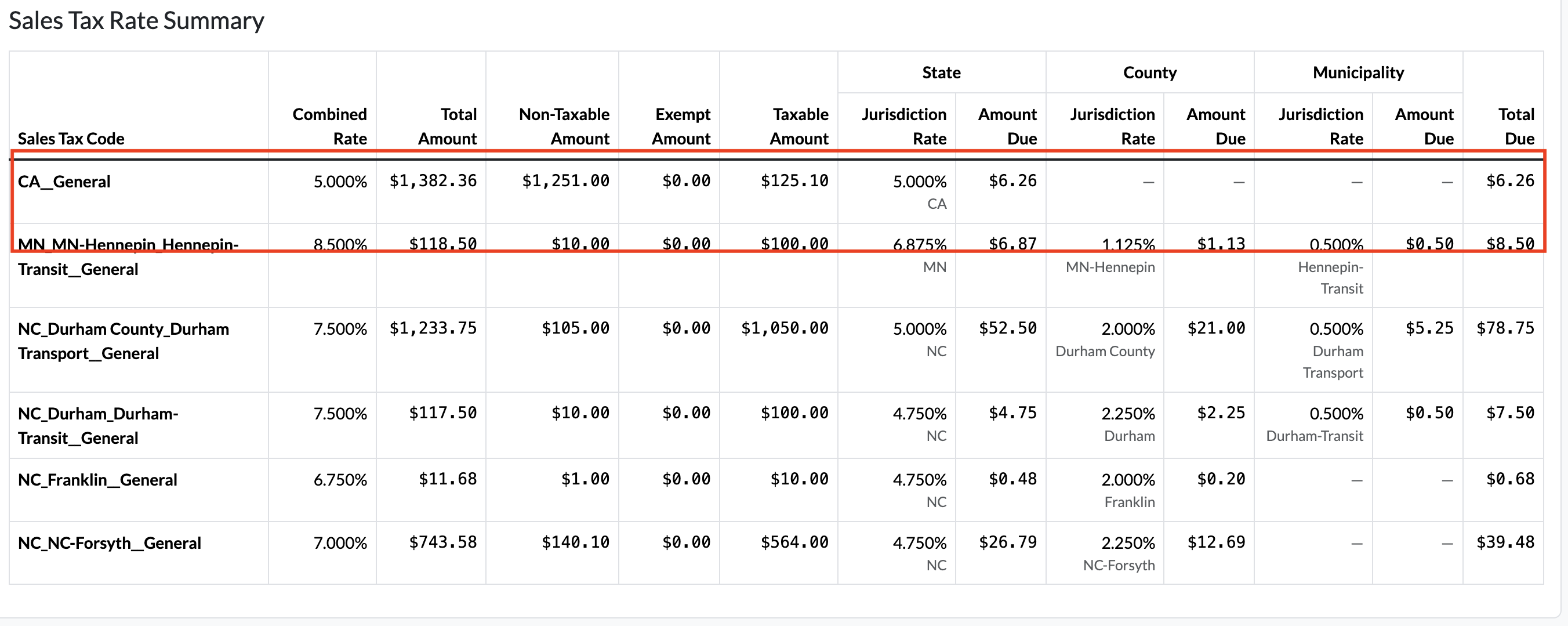
In the screenshots below, Lot #1 is taxed under MN_MN-Hennepin_Hennepin-Transit__General at 8.5%,
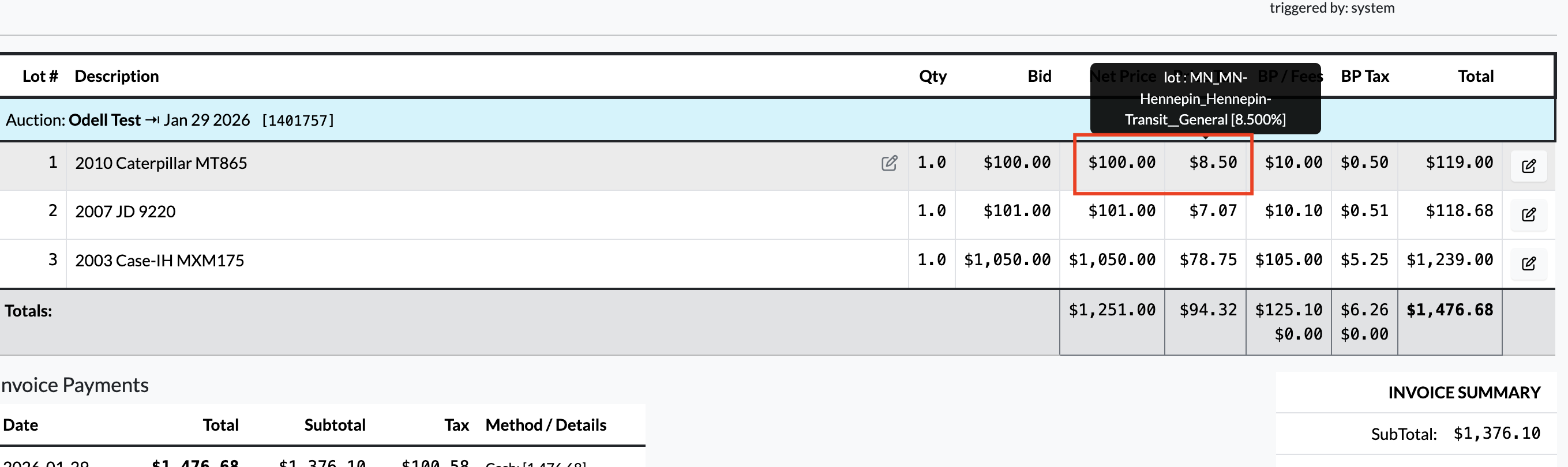
while the Buyer’s Premium is taxed under CA__General at 5%.
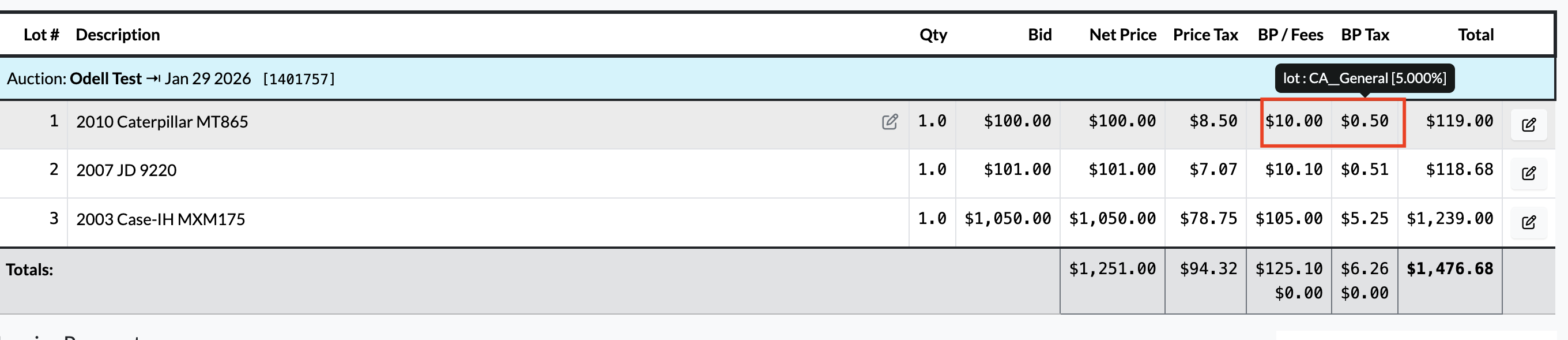
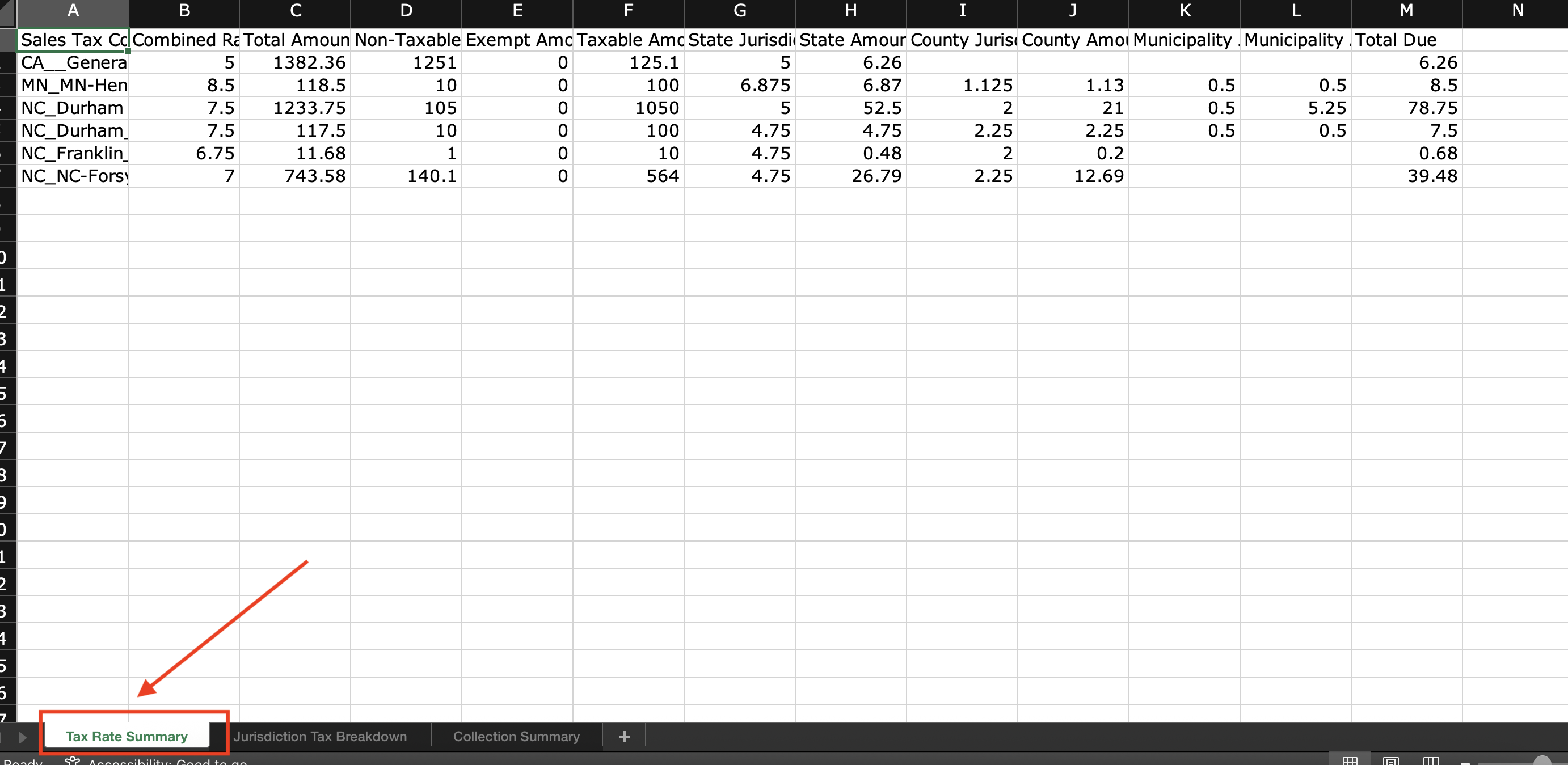
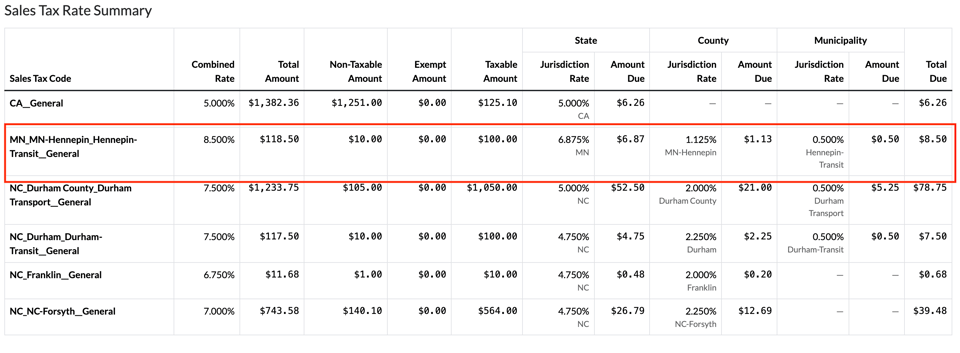
In the Sales Tax Rate Summary, when you navigate to the MN_MN-Hennepin_Hennepin-Transit__General row for the lot’s sales tax code, you will see a total of $118.50. This amount is calculated by combining the lot selling price ($100.00), the lot sales tax ($8.50), and the Buyer’s Premium ($10.00).
In the Non-Taxable Amount column, you will see $10.00, which represents the Buyer’s Premium. This amount is non-taxable under the MN_MN-Hennepin_Hennepin-Transit__General tax code because the Buyer’s Premium is taxed separately under the CA__General sales tax code.
-
Exempt Amount: This column is not yet used, but will be used in the future to note when specific bidders are exempt from paying sales tax for that rate due to their sales tax exemption status.
-
Taxable Amount: The total of the paid sold prices for lots that have this Sales Tax Code assigned to them.
Each Sales Tax Code is then broken down into individual levels when the code is made up of multiple tax rates. For example, in Minnesota, a Sales Tax Code may include state, county, and municipal taxes. In the example below, the MN_MN-Hennepin_Hennepin-Transit__General Sales Tax Code is broken into three levels of State, County, and Municipality.
Important Note: When creating tax rates with multiple levels, it is best practice to follow a consistent naming convention.
• The State code should use the state abbreviation (e.g., MN).
• The County code should use the state abbreviation followed by a hyphen and the county name (e.g., MN-Hennepin).
• The Municipality code should use the county name followed by a hyphen and the municipality name (e.g., Hennepin-Transit).
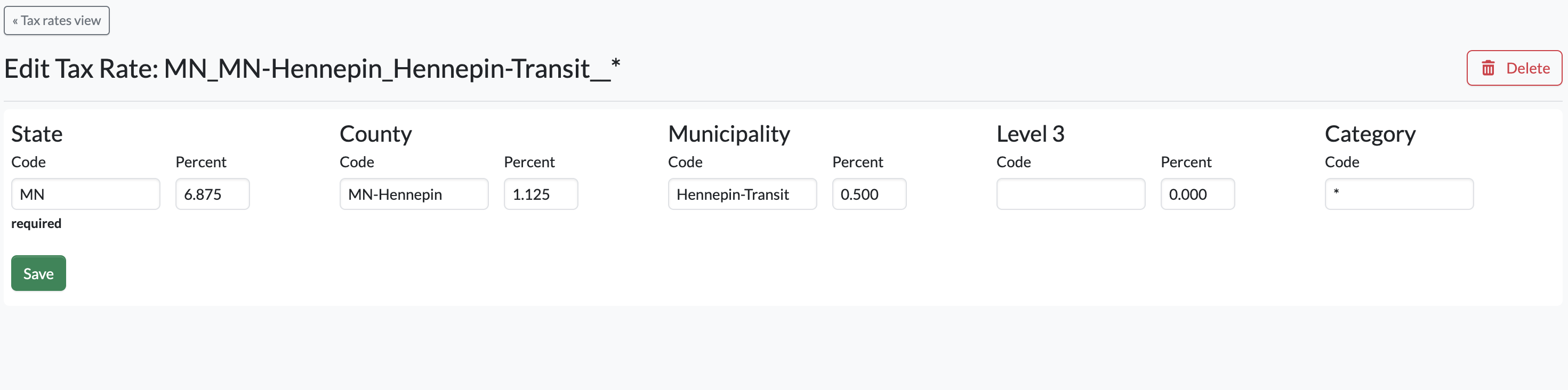
Tax codes with multiple levels should always be created using this structure to ensure clarity during the remittance process and to clearly identify where each portion of the sales tax is remittable.
In the image above, you can see that the Transit tax is remittable to Hennepin County, not the State of Minnesota. This is clear because the tax code Hennepin-Transit explicitly identifies the county as the remittance authority.
If the code were labeled only as “Transit”, it would be unclear during remittance whether the tax should be remitted to the county or the state (or another county in the state that might have a transit tax).
Within each level, you will see the Jurisdiction Rate, the total due for each level and then the far right side, the total due for that Sales Tax Code at the time the report was generated. For example:
-
MN (State): 6.875% jurisdiction rate, with $6.87 due
-
MN-Hennepin (County): 1.125% jurisdiction rate, with $1.13 due
-
Hennepin-Transit (Municipal): 0.5% jurisdiction rate, with $.50 due
When these amounts are added together, the total sales tax due for remittance is for this Sales Tax Code is $8.50
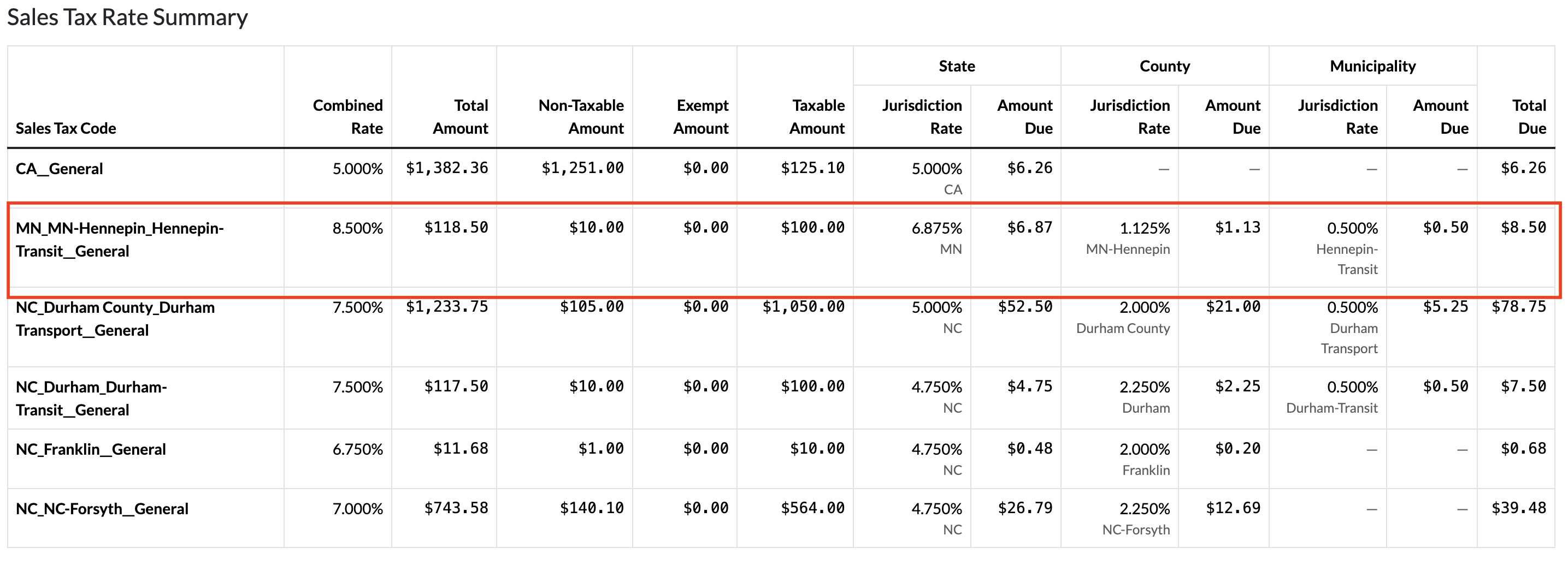
You may also see examples such as the CA__General sales tax code, which includes only a state-level jurisdiction rate. This is because the tax rate is made up of a single component rather than multiple jurisdictions.
Any other jurisdiction rates and amounts shown in this row will appear with a hyphen (–), indicating that no tax is remittable for those jurisdictions because they are not included in the selected sales tax code.
Jurisdiction Tax Breakdown Summary
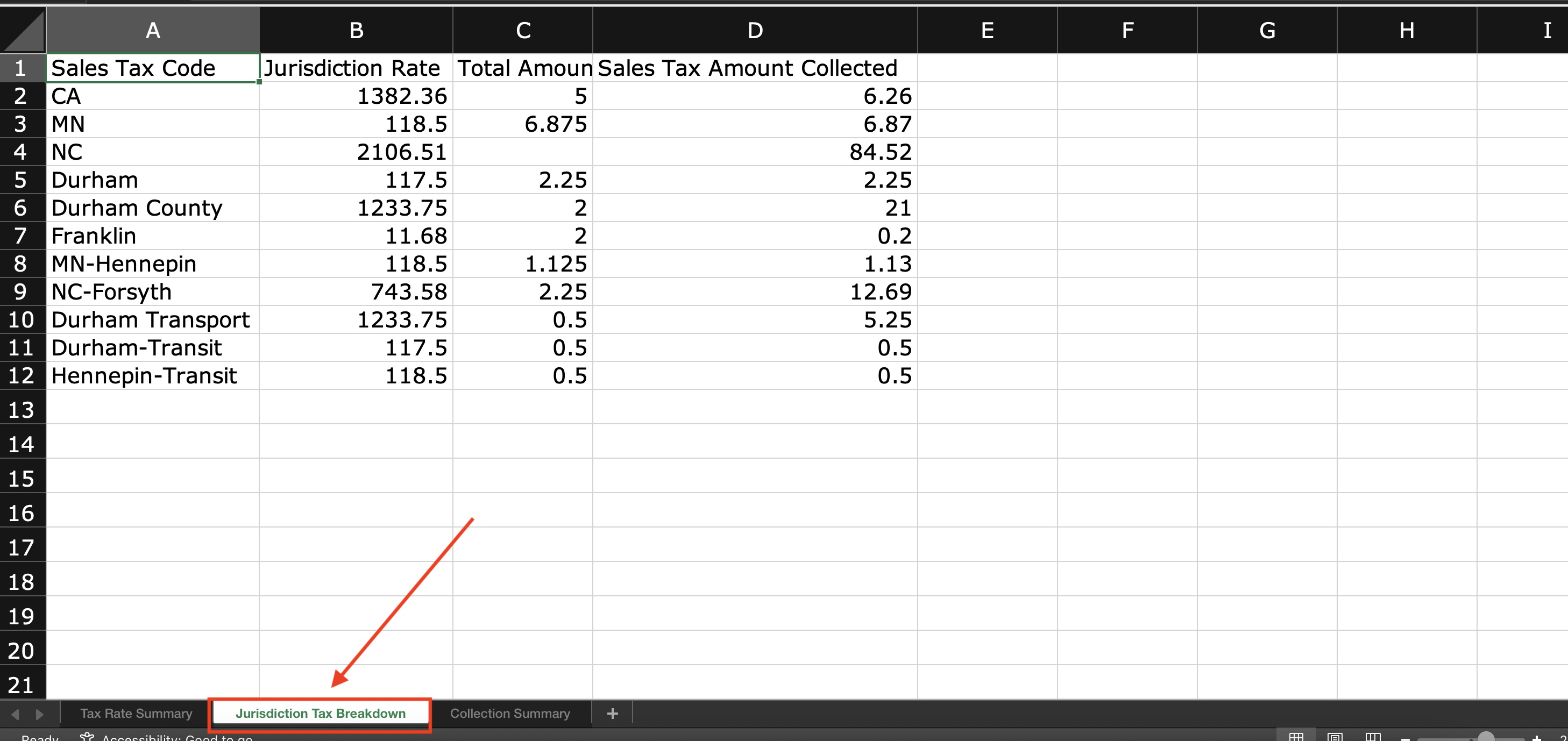
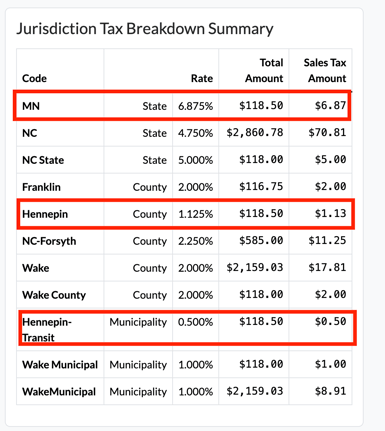
Within the Jurisdiction Tax Breakdown Summary, each component of a sales tax code is displayed separately by its respective jurisdiction, tax rate, and total amount.
The Total Amount represents the sum of all paid sold prices for lots assigned to that sales tax code, plus any applicable Buyer’s Premiums and related fees tied to those lots. This section also shows the total sales tax collected for each jurisdiction at the time the report was generated.
For example, if you reference the MN_MN-Hennepin_Hennepin-Transit__General sales tax code from the Sales Tax Rate Summary, you will see the tax broken down into the following jurisdiction levels:
• State: MN – 6.875%
• County: MN-Hennepin – 1.125%
• Municipality: Hennepin-Transit – 0.500%
Each jurisdiction shows the same Total Amount of $118.50, which reflects the combined paid sold prices and applicable fees for lots assigned this sales tax code at the time the report was generated. This amount does not represent the sales tax total itself, but rather the taxable base used to calculate sales tax.
Below this, the Sales Tax Amount column displays the actual sales tax collected for each jurisdiction:
• MN: $6.87
• MN-Hennepin: $1.13
• Hennepin-Transit: $0.50
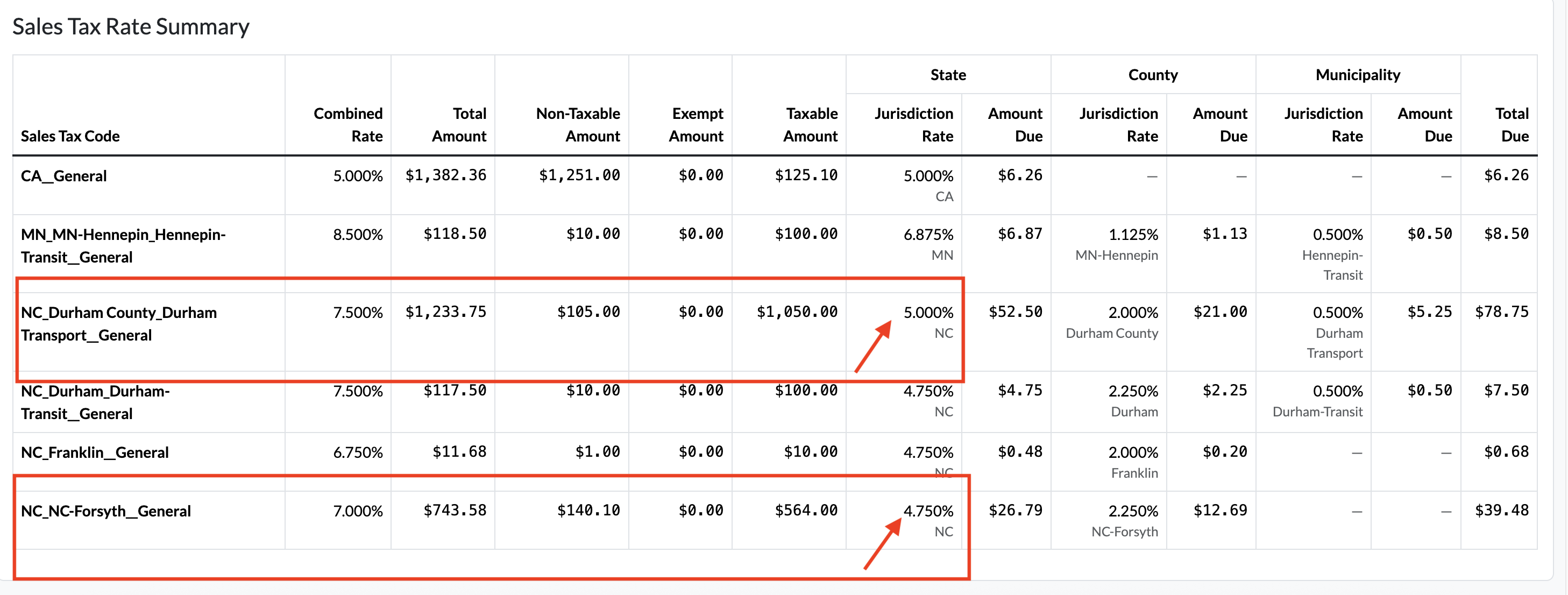
While reviewing this report, you may notice that one of the Sales Tax Code jurisdiction rates displays a hyphen (–). This indicates that the system is unable to determine which jurisdiction rate to use because, during the selected reporting period, multiple rates existed for that jurisdiction.
In the example below, the North Carolina jurisdiction rate shows a hyphen because, within the selected date range, North Carolina had two different tax rates: 5.00% and 4.75%. This situation typically occurs when a tax rate changes over time.
For instance, the NC portion of the NC_Durham County_Durham Transport__General Sales Tax Code may reflect the 2024 rate of 5.00%, while the NC portion of NC_Forsyth__General may reflect the updated 2025 rate of 4.75%.
Sales Tax Summary
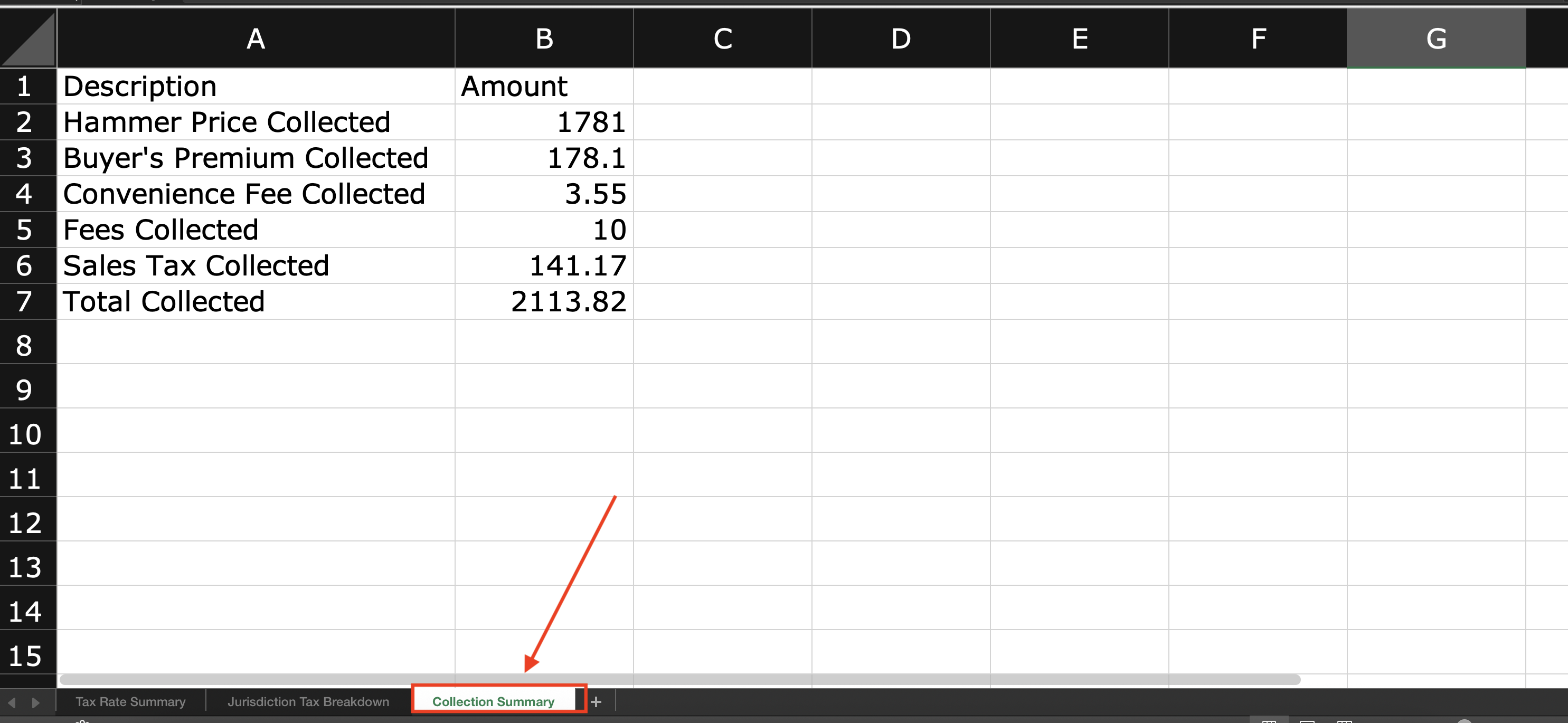
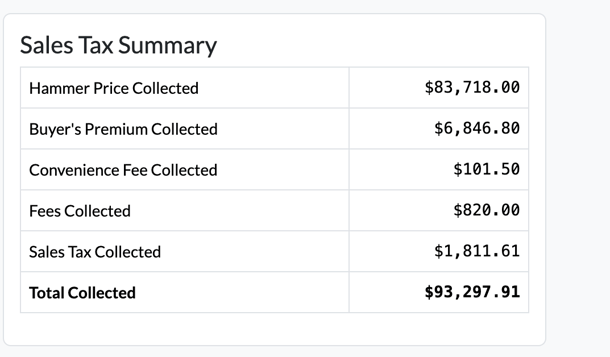
Within this section, you will be able to view totals for Hammer Price Collected, Buyer’s Premium Collected, Convenience Fee Collected (for example, credit card surcharge fees), Fees Collected (such as title fees), Sales Tax Collected, and the overall Grand Total Collected at the time the report was generated.
Please note that these totals reflect paid invoices only. Unpaid invoices are not included in the totals shown within the Sales Tax Summary.
Exporting Sales Tax Remittance as an XLSX file
You can export the Tax Rate Summary, Jurisdiction Summary, and Collection Summary directly from the UI into an XLSX file. Each of these sections is organized into its own separate sheet (tab) within the XLSX file, making it easy to review and analyze the data.