
*Internal* System Release Notes July 23, 2026
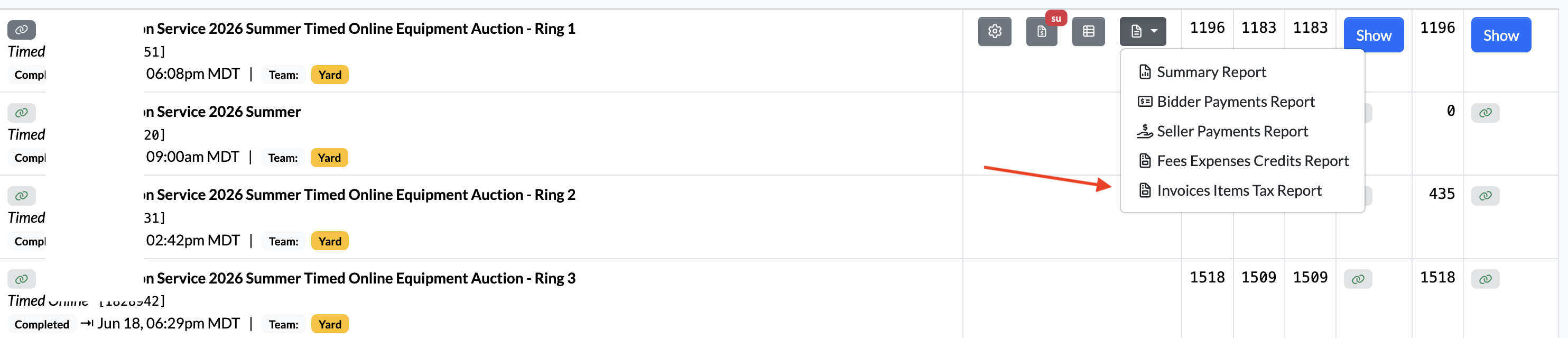
FEATURE – Invoice Items Tax Report per Auction (rings)
To provide a detailed breakdown of all taxes collected across the lots in a specific auction, NextLot has introduced the Invoice Items Tax Report.
This report was designed to help clients who need to complete sales tax remittance on a per-auction and per-lot basis, rather than by a date range, which is how the existing Tax Remittance Report currently functions.
The Invoice Items Tax Report provides a comprehensive tax breakdown for each lot, including:
- Lot sales tax rates and amounts
- Buyer's Premium tax rates and amounts
- Federal tax rates and amounts
- Provincial tax rates and amounts
- Additional tax levels (Level 2 and Level 3), when applicable
This allows clients to easily identify the exact taxes associated with each lot and invoice, even when multiple tax rates are applied.
Currently, the report is exported as an Excel spreadsheet, making it easy to filter, sort, and total the data based on your reporting needs.
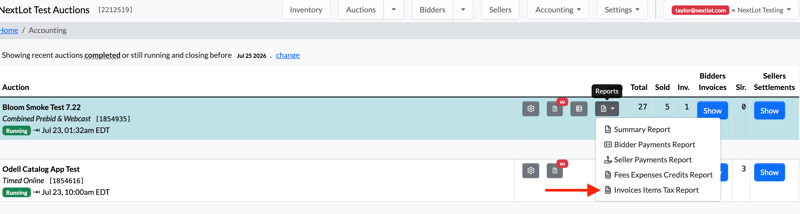
The report includes the following fields:
- Lot #
- Lot Name
- Subtotal
- Tax Amount
- Total Amount
- Price Amount
- Price Tax Rate
- Price Tax Amount
- Price Federal Tax Rate
- Price Federal Tax Amount
- Price Provincial Tax Rate
- Price Provincial Tax Amount
- Price Level 2 Tax Rate
- Price Level 2 Tax Amount
- Price Level 3 Tax Rate
- Price Level 3 Tax Amount
- Buyer's Premium Amount
- Buyer's Premium Tax Rate
- Buyer's Premium Tax Amount
- Buyer's Premium Federal Tax Rate
- Buyer's Premium Federal Tax Amount
- Buyer's Premium Provincial Tax Rate
- Buyer's Premium Provincial Tax Amount
- Buyer's Premium Level 2 Tax Rate
- Buyer's Premium Level 2 Tax Amount
- Buyer's Premium Level 3 Tax Rate
- Buyer's Premium Level 3 Tax Amount
- Invoice Status
- Invoice #
.png?width=1898&height=237&name=Screenshot%202026-07-23%20at%203.12.19%20PM%20(2).png)
.png?width=1908&height=258&name=Screenshot%202026-07-23%20at%203.12.53%20PM%20(2).png)
.png?width=1913&height=263&name=Screenshot%202026-07-23%20at%203.13.13%20PM%20(2).png)
.png?width=1904&height=262&name=Screenshot%202026-07-23%20at%203.13.19%20PM%20(2).png)
If you need to total any of the numeric columns, we recommend highlighting the entire column in Excel. In the bottom-right corner of the Excel window, you'll see the Sum displayed automatically, which provides the total for the selected column without needing to create a formula.
.png?width=1905&height=787&name=Screenshot%202026-07-23%20at%203.15.57%20PM%20(2).png)
At the bottom of the report, you'll also find a section that lists all tax refunds associated with the auction. The refunds are broken down separately for the item tax and the Buyer's Premium tax (when applicable), making it easy to identify and account for any refunded taxes.
.png?width=1877&height=365&name=Screenshot%202026-07-23%20at%203.18.04%20PM%20(2).png)
We also recognize that not every column will be relevant for every client. To make the report easier to work with, we recommend either hiding the columns you don't need or deleting them from your copy of the spreadsheet so you can focus only on the information that's relevant to your reporting needs.
For multi-ring auctions, there will be one consolidated Invoice Items Tax Report for the entire auction. All lots from every ring will appear together in a single Excel report. The report is not separated by ring, nor is it divided into multiple worksheets or tabs within the Excel file. This provides one comprehensive report containing all taxable invoice items for the auction.
FEATURE – Auction SMS Marketing Notifications
To provide a more efficient marketing approach for clients auctions, we have created an option where bidders can opt into receiving an SMS reminder roughly 3 day about ALL upcoming auctions (not just ones that they have requested to bid in). This option is now available to opt into as the 3rd option under SMS notifications in the bidders notification settings page (shown below).
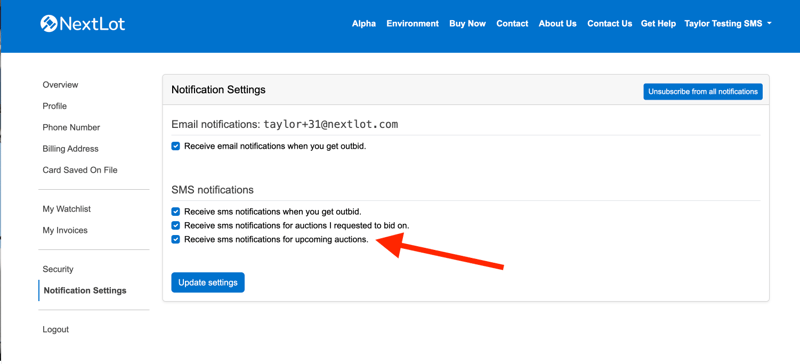
With the addition of this 3rd option, we have re-phrased the 2nd option, which is the receiving of SMS notification reminders for auctions that you have requested to bid in.
When a bidder begins their registration journey in the system and they get to the phone numbers page, the disclaimer for opting into the SMS notifications has changed. It now reads:
Checking this box enables SMS notifications for important auction updates. This is recommended for the best bidding experience.
You can choose exactly which notifications you receive from your account notification preferences.
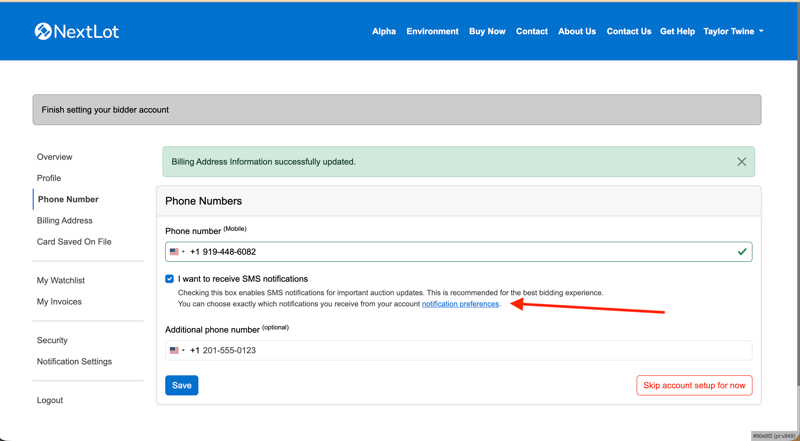
If a bidder checks this box and performs the 2 factor verification of their phone #, they will automatically be opted into ALL 3 of the SMS notification options. Our hope is that most new bidders will do this moving forward, increasing the # of bidders who get these notifications.
If a bidder opts into these and they then go to an auction and request to bid, they will be presented with the option to opt in or out of receiving the SMS reminders about that individual auction (shown below)
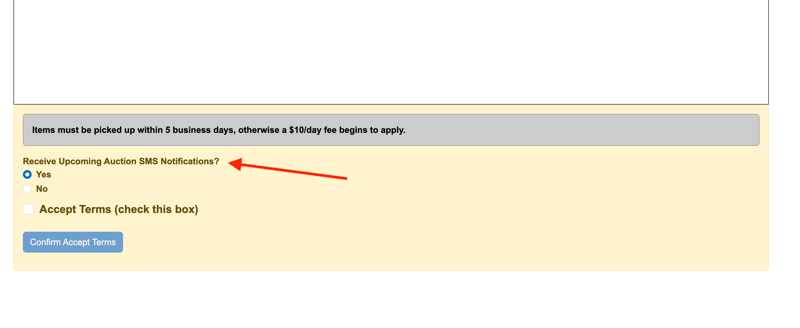 This will have NO bearing on their site settings of opting in or out of the "SMS notifications for upcoming auctions." It will only affect whether or not they will receive the SMS notifications for this auction regarding "Receive sms notifications for auctions I requested to bid on."
In the bidder admin- you can view which of the notifications a bidder has opted into via their profile:
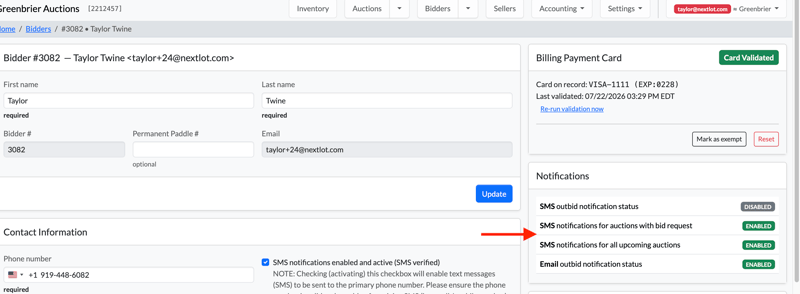
Now that we have summarized how to opt-in/opt out of these SMS notifications, lets revisit the cadence at which all NextLot SMS notifications are sent.
Outbid SMS Notifications:
All SMS outbid notifications are sent immediately following you being outbid. The only time these notifications are NOT sent is if you opt out of them OR if you are outbid within the Bid Extension time since you submitted your bid. For example, if a timed auction has a bid extension of 2 minutes and bidder Tim goes to a lot and bids $10 at 10:00am and someone comes in and outbids him BEFORE 10:02am, then he will NOT receive a notification. Tim will only receive a notification if someone outbids him if the time at which the next bidder places his/her bid is further in the future than the bid extension time frame for that auction.
Receive SMS notifications for auctions I requested to bid on:
Auctions must be published in order for the SMS's to be triggered.
For Prebid+Webcast and Absentee+Webcasts:
Receive SMS notification when the Start Prebidding/Absentee start time is reached.
Receive SMS notification when the Start Webcast time minus 24 hours is reached.
Receive SMS notification when the Start Webcast time minus 30 minutes is reached.
For Webcasts:
Receive SMS notification when the Start Webcast time minus 24 hours is reached.
Receive SMS notification when the Start Webcast time minus 30 minutes is reached.
For Timed Auctions & Sealed Bid Auctions:
Receive SMS notification when the Start Bidding time is reached.
Receive SMS notification when the End Bidding time minus 24 hours is reached.
Receive SMS notification when the End Bidding time minus 30 minutes is reached.
Receive SMS notifications for upcoming auctions:
This new format of SMS's is sent approximately 3 days prior to to the bidding beginning/ending (depending on the auction type) of a published auction. There is also special circumstances surrounding when these times are (in order to avoid sending someone messages late at night/early in the morning).
For Timed based auctions closing between 11:01am and 7:59pm:
Receive SMS notification 72 hours (3 days) before the closing_starts_at time
For webcast based auctions opening between 11:01am and 7:59pm:
Receive SMS notification 72 hours (3 days) before the webcast_starts_at time
For Timed based auctions closing between 8:00pm and 11:00am:
Receive SMS notification between 60-83 hours before the closing_starts_at time, at 12:00pm local time for the auction house.
For webcast based auctions opening between 8:00pm and 11:00am:
Receive SMS notification 60-83 hours before the webcast_starts_at time, at 12:00pm local time for the auction house.
Lets look at some examples:
Straight Webcast- Bidding opens 7/25 at 10:00am. The upcoming auction SMS will be sent 7/22 at 10:00am.
Timed Auction- Bidding opens 7/25 at 10:00am and closes 7/27 at 12:00pm. The upcoming auction SMS will be sent 7/24 at 12:00pm.
Prebid+Webcast- Prebidding opens 7/30 at 9:00am and closes 8/5 at 5:00pm. Webcast opens 8/6 at 9:00am. The upcoming auction sms will be sent at 8/3 at 12:00pm.
Timed Auction- Bidding opens 7/25 at 10:00am and closes 7/27 at 8:00pm. The upcoming auction SMS will be sent at 7/24 at 12:00pm.
With this new feature, we are going to suggest that people add a note in clients site banners like so:
 This will alert customers to the new option and hopefully push adoption. The code for this as follows:
<p style="text-align: center;">New SMS Notifications Now Available- update your settings under your Notifications Preferences</p>
<div style="text-align: center;"><a class="btn btn-group-auth capitalize text-white btn-primary my-1 mx-5" href="https://greenbrier.nextlot-alpha.com/account">CLICK TO UPDATE YOUR NOTIFICATION SETTINGS</a></div>
Just make sure to update the URL from https://greenbrier.nextlot-alpha.com/account to your client's domain/account.