*Internal* System Release Notes
FEATURE UPDATE – Bidder Invoices Page & Bidder Invoices Report
This update includes two enhancements to help auction houses more easily view, manage, and export bidder invoice information.
1. Bidder Invoices Page Enhancements
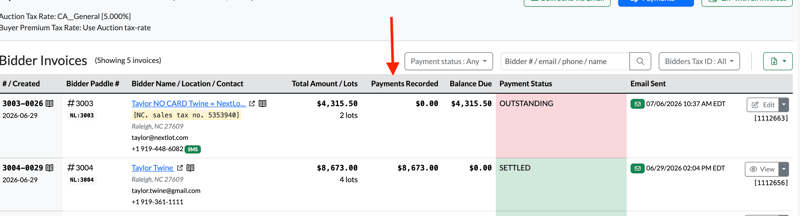
The Bidder Invoices page within each auction has been updated with several new fields and usability improvements.
.png?width=800&height=284&name=Screenshot%202026-07-02%20at%2010.07.37%20AM%20(2).png)
New Paddle Number Column
The bidder's Paddle Number now appears in its own dedicated column, making it easier to quickly identify bidders regardless of whether they registered through:
- NextLot
- Onsite Registration
- A third-party bidding platform
New Bidder Name / Location / Contact Column
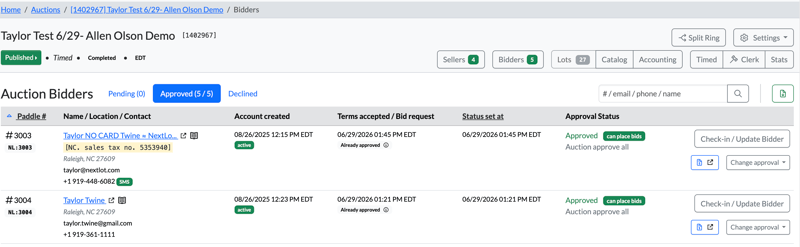
A new Bidder Name / Location / Contact column has been added. This section displays:
- Bidder Name (hyperlinked to the bidder's profile)
- Tax Exemption Number (highlighted in yellow, when applicable)
- City
- Postal Code
- Email Address
- Phone Number
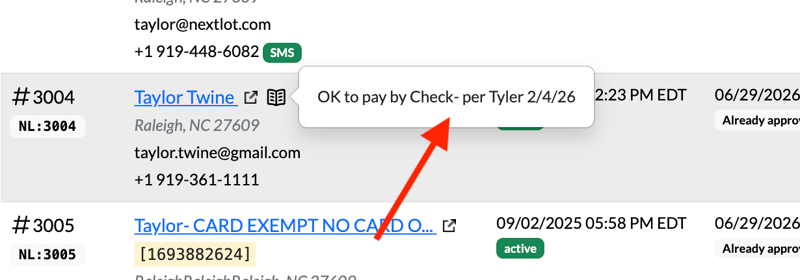
You'll also notice a Bidder Note icon within this column if the bidder has a note attached to their. Similar to the Invoice Note icon found in the #/Created column, hovering over this icon will display any notes saved on the bidder's profile.
.png?width=800&height=122&name=Screenshot%202026-07-02%20at%202.06.47%20PM%20(2).png)
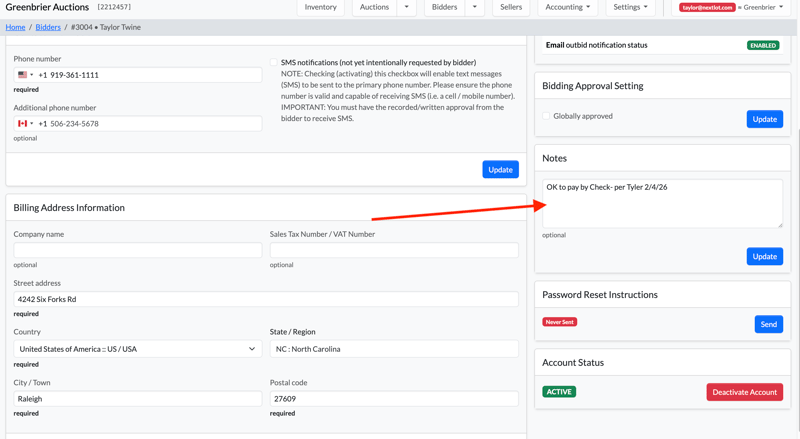
To add a note to a bidder's profile, click on their hyperlinked name (as seen above) to open up their profile and then add text to their profile under the notes section (shown below). The note icon will appear next to this bidder whenever they are checked into an auction and whenever they are invoiced.
For example, an auction house may have a note indicating that a bidder is only permitted to pay by cash or check. You can see this note by hovering over the icon.
This view is now identical to the one shown on the Auction Bidders tab (shown below) meaning the same bidder information is shown in the column view (to give the system some symmetry).
Payments Recorded Column
A new Payments Recorded column has also been added, allowing you to quickly see the total sum of the payments that have been applied to each invoice.
2. Bidder Invoices Report (Excel & PDF Export)
You can now download the Bidder Invoices page as either an Excel spreadsheet or a PDF.
This report provides a convenient snapshot of important invoice information, including:
- Total Amount Due
- Payments Recorded
- Remaining Balance Due
- Payment Status
Note: This export does not download individual invoice PDFs. If you need copies of every invoice, continue using the Zip with All Invoices feature. The new report is intended to provide a high-level overview of invoice information for reference, reporting, and reconciliation.
Downloading the Report
To download the report:
- Navigate to the applicable auction's Bidder Invoices page.
- Click the green Download icon in the upper-right corner.
- Select either:
- All Invoices (Excel)
- All Invoices (PDF)
.png?width=1878&height=649&name=Screenshot%202026-07-02%20at%2010.52.06%20AM%20(2).png)
Excel Report Fields
The Excel export includes the following information:
- Invoice #
- Primary Auction
- Auction Paddle #
- Bidder Full Name
- Bidder Company
- Bidder Email
- Bidder Phone #
- Bidder Additional Phone #
- Bidder Address
- Bidder City
- Bidder State
- Bidder Postal Code
- Bidder Country
- Bidder Tax Exempt Details
- Bidder Note
- Invoice Lot Count
- Invoice Gross Total Due
- Invoice Total Paid
- Invoice Balance Due
- Payment Status
- Payment Outstanding
- Settled
- Refund Pending
- Payment Restricted
- Public Invoice Notes
- Private Invoice Notes
.png?width=1878&height=188&name=Screenshot%202026-07-02%20at%2010.50.13%20AM%20(2).png)
PDF Report
When downloading the PDF version, the Print Page modal automatically opens and defaults to Landscape orientation, which is the recommended format for fitting all report columns on the page.
The Notes column within the PDF combines both:
- Invoice Notes
- Bidder Profile Notes
This allows auction staff to quickly reference all important notes in one location with a handheld copy.
.png?width=1899&height=915&name=Screenshot%202026-07-02%20at%2010.54.33%20AM%20(2).png)
Report Organization
Both the Excel and PDF reports are automatically organized by Paddle Number, making it easy to locate bidders and review invoice information in paddle order.
.png?width=871&height=210&name=Screenshot%202026-07-02%20at%202.03.59%20PM%20(2).png)
.png?width=847&height=568&name=Screenshot%202026-07-02%20at%2010.52.15%20AM%20(2).png)
FEATURE – Show seller agreement #(s) in list of Seller Settlements
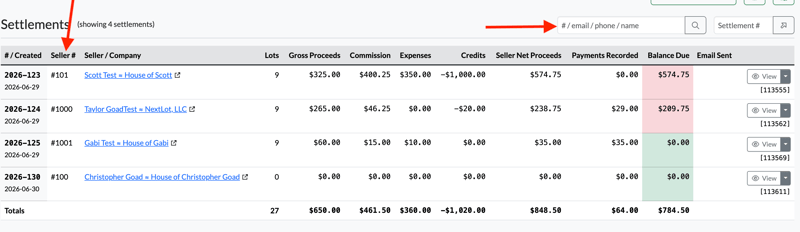
You can now view AND search through the Seller Settlements using the seller agreement # for a particular seller. This unique number can be searched to bring up the settlement for just that particular seller.
FEATURE – Searching for bidders/sellers who do NOT have email addresses on their account
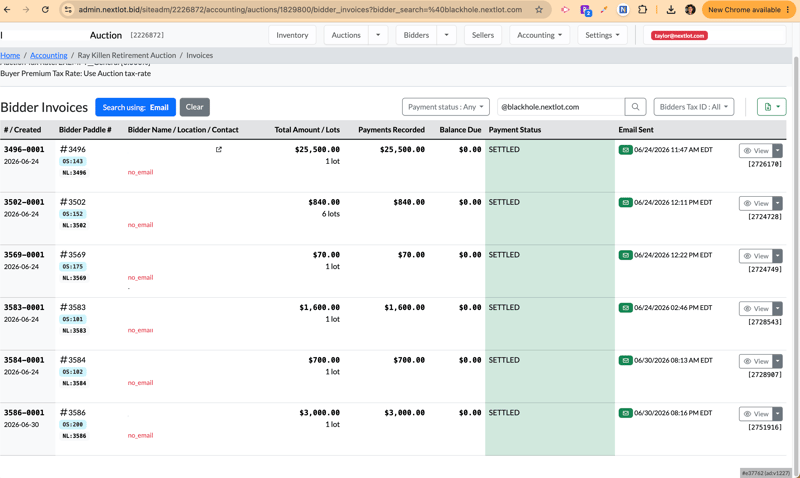
You can now easily search for bidders/sellers within auction who are registered but did not provide an email for their account. These could be onsite bidders who declined to provide an email address or a seller who refused to provide one. To search for these particular bidders/sellers, go to either the invoicing area or settlement area for this particular auction and search @blackhole.nextlot.com (the automatic email domain assignment to these types of accounts) and then your
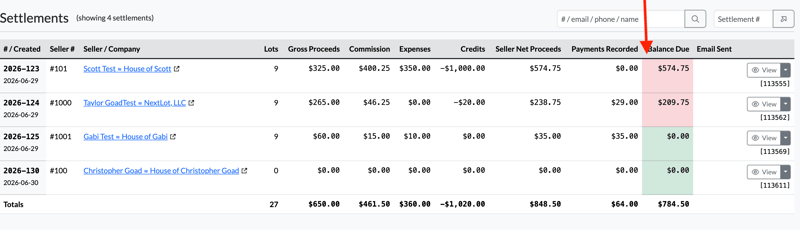
 FEATURE - Add Color Shading to the Seller Settlements
We can now view color cues on the seller settlement page within the balance due column. This provides a quick view of which sellers are still owed funds.