
*Internal* System Release Notes February 23rd, 2026
FEATURE: Ability to Register a Seller Without an Email Address
Previously, when registering a seller in the system, an email address was required. The email field was mandatory, and a seller profile could not be created without one.
We understand that not all auction houses collect or record seller email addresses. To improve the user experience, we have introduced a new option. If a seller does not have an email address on file, you can now select the “No Email” checkbox.
When selected, the system will automatically generate a placeholder (“dummy”) email address using our custom domain, allowing you to successfully create the seller profile without requiring a valid personal email.
.png?width=1893&height=830&name=Screenshot%202026-02-23%20at%2011.01.09%20AM%20(2).png)
.png?width=1906&height=497&name=Screenshot%202026-02-23%20at%2011.01.20%20AM%20(2).png)
While some sellers will not want to give an email, it is important to note that when a seller does not have an email, there will be no way to electronically send them a copy of their seller settlement. NextLot strongly recommends sellers provide a valid email address for their account, but if they do not, then using the No Email function above is recommended.
FEATURE: New Level of Bidder Information Disclosure on Seller Settlements
Previously, seller settlements (Email/PDF) offered two disclosure options regarding bidder information:
- No Disclosure – No bidder information is displayed on the seller settlement.
- Full Disclosure – Displays the bidder’s full name, billing company name (if applicable), and phone number.
We have now introduced a third option:
- Generic Disclosure – Displays the bidder # and the bidder's full name (see example below) .
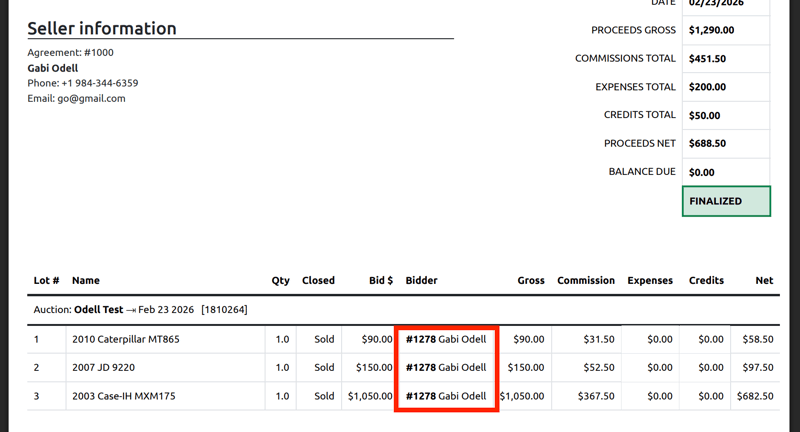
See below for an example of the new option for full disclosure:
.png?width=1040&height=814&name=Screenshot%202026-02-23%20at%2011.00.10%20AM%20(2).png)
This setting can be configured either site-wide or on an auction-by-auction basis.
Site-Wide Setting
(Applies to all future seller settlements)
To control bidder information visibility across all seller settlements:
- Navigate to Settings in the top navigation bar.
- Click Auctions, then select the Accounting tab.
- Under Seller Settings, locate Disclose Bidder Contact Info to Seller.
- Choose one of the following options:
- No Disclosure – Hides bidder information from the seller settlement.
- Full Disclosure (updated to show phone #) – Displays the bidder’s full name, billing company (if applicable), and phone number.
- Generic Disclosure (New) – Displays the bidder # and the bidder name.
.png?width=1899&height=442&name=Screenshot%202026-02-23%20at%2010.53.44%20AM%20(2).png)
.png?width=1882&height=528&name=Screenshot%202026-02-23%20at%2010.54.24%20AM%20(2).png)
Auction-Specific Setting
(Applies to a single current or upcoming auction)
To control bidder information visibility for a specific auction:
- Navigate to the desired auction.
- Click the gear icon, then select Accounting.
- Open the Accounting tab.
- Under Seller Settings, locate Disclose Bidder Contact Info to Seller.
- Select one of the following:
- No Disclosure – Hides bidder information from the seller settlement.
- Full Disclosure (updated to show phone #) – Displays the bidder’s full name, billing company (if applicable), and phone number.
- Generic Disclosure (New) – Displays only the bidder # and the bidder name.
.png?width=1899&height=812&name=Screenshot%202026-02-23%20at%2010.54.12%20AM%20(2).png)
.png?width=1899&height=540&name=Screenshot%202026-02-23%20at%2010.54.21%20AM%20(2).png)
This added flexibility allows auction houses to choose the level of bidder information shared with sellers based on their specific business preferences.
Updated Knowledge Base Articles:
Smoke Test Protocols: Timed Auction + Settle Up (Sellers)
Smoke Test Protocols: Prebid/Webcast Auctions + Bidder Invoicing